If you searched for a Klarity Disk review, you probably met Macworld’s headline first: “Affordable Mac disk analyzer held back by permissions bug.” It is a fair headline. I have read Macworld for years, so being reviewed there at all meant a lot, even with that verdict. This is a thank-you to Chris Barylick, who wrote it, and an honest account of what his review changed.
- 13 April 2026: Macworld reviews Klarity Disk 1.1 and rates it 4 out of 5. It likes the app and finds a bug that stops it deleting apps.
- 10 September 2026: Klarity 1.3 ships, rebuilt around that bug.
- Next: Klarity 1.3.1 will let Klarity see hidden folders such as Library. More on that below.
What Macworld liked
Most of the review was kind, and specific enough to be useful. It liked how much of the app you can adjust in Settings, and the RAM and CPU tools that sit beside the disk map. It liked the one-time price: $6.99, about $3 less than DaisyDisk, with no subscription. It liked the look of the interface across its six colour themes. It also noted the privacy promises, which still hold: no cloud, no account, no analytics.
What went wrong
Then came the part that mattered more. When Chris tried to delete apps with Klarity, it kept telling him he did not have permission, even though he was an administrator on his own Mac. His advice was to wait for a fix before buying. For version 1.1, that was the right advice.
Here is the plain version of why. Every app sold on the Mac App Store is walled off from the rest of your Mac. It can only touch the places you have pointed it at yourself. Version 1.1 remembered very little of what you pointed at, so a delete anywhere else was refused, and the message sent you looking for the wrong fix.
I test Klarity on my own Mac, in the folders I use every day. Chris used it the way a new owner would: he went straight to his Applications folder to clear out apps. I could have tested for months without doing that.
What changed in Klarity 1.3
Klarity 1.3 is built around that one paragraph of the review. The technical story is in Klarity 1.3: why Move to Trash used to fail. Here is what you see now:
| Situation | Klarity 1.1, as Macworld tested it | Klarity 1.3, today |
|---|---|---|
| Deleting outside a folder you had picked | Refused, with a confusing error | Asks once for that drive, then works |
| What it remembers | One folder | Every drive you grant |
| Scanning Downloads before you had picked it | Showed an empty folder | Asks for access first |
| Something macOS itself protects | A button that could never work | Says so plainly and shows it in Finder |
When Klarity needs access, it now tells you exactly what for, in words like these:
Klarity needs this to move “Old Project” to the Trash.
Then it opens Apple’s own folder picker, which Klarity cannot see into or control. You choose your drive once, and Klarity remembers it.
And when macOS itself says no, Klarity no longer pretends otherwise:
Finder needs an admin password to delete Keynote.
Next to it is a Reveal in Finder button, so you can finish the job with your password.
So, for the apps in Macworld’s test: an app you installed by dragging it into Applications now goes to the Trash after that one-time grant. An app installed from the App Store, like Keynote, is protected by macOS, so it needs your administrator password, and Klarity sends you to Finder for it. Apps that came with your Mac cannot be removed by any app, and that is by design.
Deleting is still careful. Klarity only ever moves things to the Trash and never empties it. Every delete asks first, and a folder of 1 GB or more needs a deliberate slide to confirm.
Three things the review taught me
Test like a stranger. The bug lived exactly where I never went. Now every scan and every delete checks access first, wherever it happens, instead of relying on the paths I happen to use.
A quiet failure is worse than a loud one. Klarity 1.1 sometimes did nothing and said nothing. That is worse than an error, because you blame yourself. In 1.3, if something cannot happen, you are told why.
An honest sentence beats a hopeful button. Offering “Grant Access” for a file macOS would never release was a small lie. “Finder needs an admin password” is less magical, and true.
A Mac disk space analyzer is only worth having if you can act on what it shows you. In 1.1, acting was the weak spot. Every change above came from taking the review seriously instead of arguing with it.
Thank you, Macworld
Reviewing a small app from a solo developer takes time, and naming a real bug in public is the most useful thing a reviewer can do. It gave me a better app. So: thank you, Chris, and thank you, Macworld.
Chris, if you would like to take a second look at 1.3, a promo code is yours. The same goes for any reviewer: ask through the support page.
What is still to do
One limitation, stated plainly. Klarity 1.3 skips folders that macOS marks as hidden, and your Library folder is one of them. That is where caches and app leftovers pile up. Version 1.3.1 fixes it and is on its way. Until then, pick Choose Folder…, press Cmd + Shift + G in the panel, and type ~/Library. What System Data on a Mac actually is explains what is safe to clear in there.
Try it for yourself
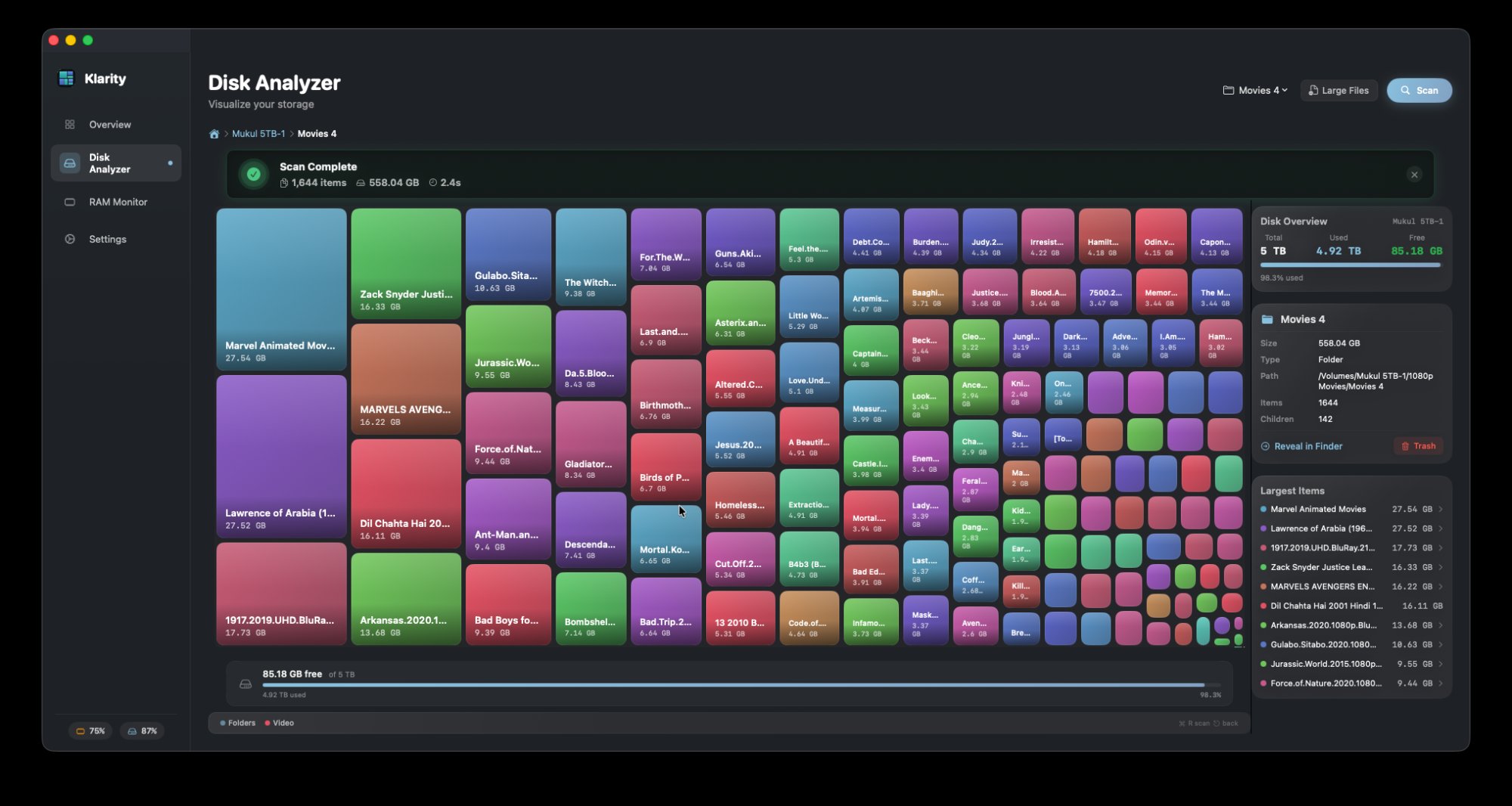
Klarity Disk is $6.99 once on the Mac App Store, for macOS 14.6 and later. It draws your disk as a map where the biggest rectangles are the folders using the most space, and it can colour them by age, so what is both large and long forgotten stands out. Read Macworld’s full review too, and judge for yourself.
Questions people ask
What did Macworld say about Klarity Disk?
Macworld reviewed version 1.1 on 13 April 2026 and rated it 4 out of 5. It praised the settings, the RAM and CPU tools, the one-time $6.99 price and the interface, and found a permissions bug that stopped the app deleting apps. It advised waiting for a fix.
Did Klarity fix the permissions bug Macworld found?
Yes. Klarity 1.3, released on 10 September 2026, asks for access once per drive, remembers it, and checks access before every scan and every delete. Items that macOS itself protects still need an administrator password, and Klarity now says so and shows them in Finder.
Can Klarity Disk delete apps?
Yes, for apps you installed yourself by dragging them into Applications. Apps from the App Store need an administrator password, which Finder asks for. Apps that came with your Mac cannot be removed by any app.
Is Klarity Disk worth it?
If you want to see what fills your Mac and clear it safely, it costs $6.99 once, with no subscription. It shows your disk as a map, can colour it by age, and only moves files to the Trash after you confirm.
Does Klarity Disk collect any data?
No. It has no network access at all, no accounts and no analytics. What it learns about your disk stays on your Mac.
— Mukul