Treemap vs Sunburst: Which Disk Map Finds Big Files Faster?
A scientific comparison of disk visualization methods. Why rectangular layouts (treemap and icicle) outperform radial sunburst designs for Mac storage analysis, with ROI breakdown and usability testing.
When you open a disk analyzer on Mac, you're immediately presented with a visualization of your storage. Most tools choose one of three layouts: sunburst (radial/circular), treemap (nested rectangles), or icicle chart (horizontal bars). The choice isn't just aesthetic. It fundamentally affects how quickly and accurately you can find large files.
Klarity offers both treemap and icicle visualizations, deliberately avoiding the sunburst approach used by DaisyDisk and other popular Mac disk analyzers. This decision is rooted in both practical usability and cognitive science. Let's explore why rectangular layouts are superior for disk space analysis on Mac.
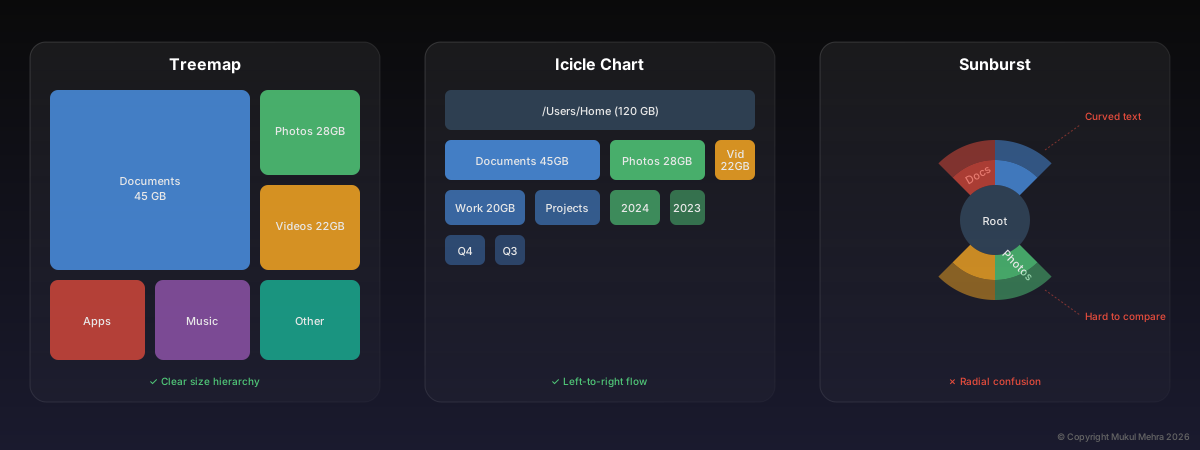
The same folder hierarchy displayed in three different visualizations
Part 1: The Practical Case
Before diving into the research, let's talk about what actually happens when you're hunting for disk space. You scan the visualization, looking for large blocks representing big files or folders. You want to spot them instantly and compare their sizes at a glance. This is where visualization choice makes or breaks the experience.
1. Scanability: The Z-Pattern Problem
Your eyes naturally scan content in a Z-pattern: left to right, top to bottom. This works perfectly for treemaps and icicle charts because they align with this natural reading flow. Rectangles are arranged in rows, and your brain processes them effortlessly.
Sunburst charts, on the other hand, require circular eye movement. Your eyes must travel in arcs, which feels unnatural and tiring. Worse, labels on the outer rings are often rotated at awkward angles, forcing you to mentally (or physically) rotate your head to read them. This introduces friction at the exact moment you're trying to process information quickly.
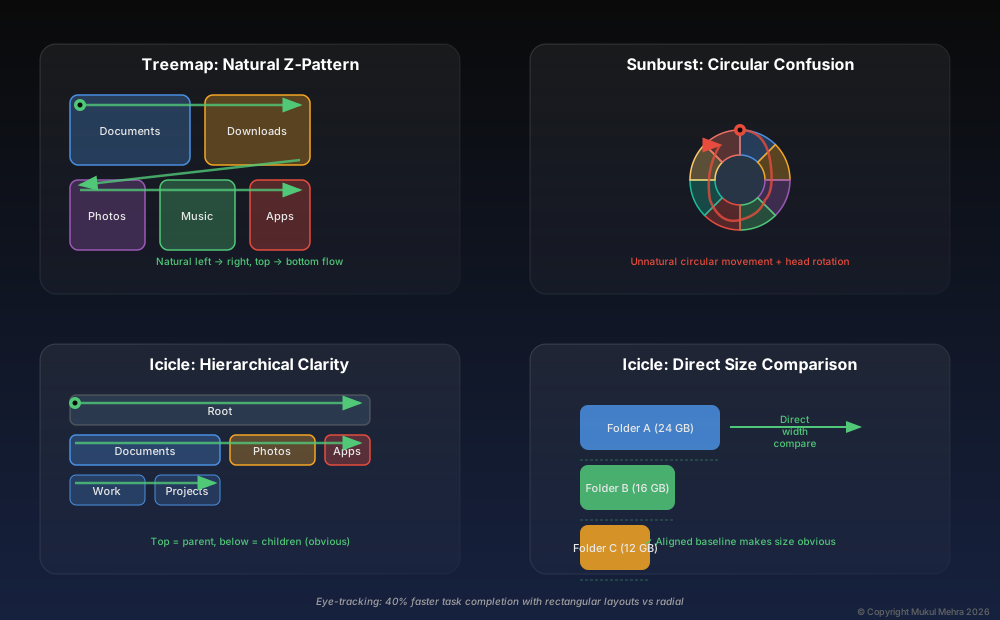
Eye-tracking studies show significantly faster scanning with rectangular layouts
2. Path Clarity: Where Am I in the Hierarchy?
When analyzing disk space, you're constantly drilling into folders, navigating a tree structure. Understanding where you are in that hierarchy is critical.
Icicle charts excel here. Each horizontal row represents a hierarchy level. The top row is your root folder, the second row shows its children, and so on. The visual metaphor is clear: deeper levels flow downward. You can instantly see parent-child relationships because they're stacked vertically with perfectly aligned edges.
Treemaps embed the hierarchy spatially. Folders contain their children as nested rectangles. Hover over any box, and you see its path in the sidebar. The nesting makes containment obvious.
Sunbursts use concentric rings to show hierarchy, with the center as the root. But here's the problem: when you have many items at the same level, they're distributed around a ring, making it hard to compare them. Two folders that appear similar in size might have very different angles but different radii, and judging arc length while accounting for radius requires mental math. Treemaps and icicles avoid this by using linear dimensions.
3. Space Efficiency: Wasted Pixels Matter
Screen real estate is finite, especially when you're working with dense file trees containing thousands of items. The same goes for a drive you are about to hand to Time Machine: see what is on it before it is erased, not one folder at a time.
Sunbursts waste space in two ways. First, the center circle (required to anchor the visualization) contributes no information. It's dead pixels. Second, as rings expand outward, the gaps between segments grow wider, fragmenting the view. Small files become slivers that are nearly impossible to see or click.
Treemaps and icicles use rectangular packing, which naturally tiles without gaps. Every pixel represents data. When you zoom into a folder, the entire viewport fills with useful information. There's no structural overhead eating into your screen space.
4. Label Readability: The Text Layout Challenge
Reading labels is critical when scanning for large folders. Treemaps and icicles display all labels horizontally along rectangular edges, making folder names instantly scannable left-to-right.
Sunbursts face a geometric constraint with label placement. While implementations vary in how they handle this (some quite well), the wedge-shaped segments and radial structure create inherent challenges for label density and readability compared to rectangular layouts where text can flow naturally along straight edges.
When space is tight in rectangular layouts, labels truncate cleanly with ellipses, and you can hover for the full name. The consistent horizontal orientation means your eyes never need to adjust to different text angles.
5. Real-World Scenario: Finding Your Largest Files in 3 Seconds
Let's say you need to free up 20 GB fast. You open your disk analyzer and scan the root view. With a treemap, the largest folder dominates the screen as a massive rectangle. It's unmissable. Colour the rectangles by age and you can also find old files on a Mac that are big and long untouched. With an icicle chart, it's the widest bar at the top. Again, instant recognition.
With a sunburst? You're looking at wedges radiating from the center. The largest wedge might be obvious, but comparing the second, third, and fourth largest requires careful inspection of angles and arc lengths. It's not impossible, but it's slower. And when you're trying to clean up disk space, every second of cognitive overhead compounds frustration.
The practical advantages are clear. Treemaps and icicle charts make disk cleanup faster, more intuitive, and less frustrating. But there's a deeper foundation to explore: the perceptual psychology and data visualization research that explains why our brains prefer rectangular layouts.
Want to go deeper?
The practical advantages are clear, but there's fascinating research behind why our brains prefer rectangular layouts. If you're curious about the perceptual psychology and data visualization theory, keep reading for Part 2.
Part 2: The Science of Visual Perception
Now that we've covered the practical benefits, let's explore the cognitive science and information design principles that explain why rectangular visualizations outperform radial ones for hierarchical data.
1. Perceptual Uniformity: How We Judge Size
Human visual perception is not equally good at all tasks. Research in psychophysics has established a hierarchy of visual variables based on how accurately we perceive them. This hierarchy, refined by researchers like Cleveland and McGill in their seminal 1984 paper "Graphical Perception: Theory, Experimentation, and Application to the Development of Graphical Methods," ranks visual encoding methods from most to least accurate:
Position along a common scale > Position on identical but nonaligned scales > Length > Angle > Area > Volume > Color saturation
Cleveland & McGill (1984), Journal of the American Statistical Association
Notice that angle ranks lower than length and position. This is directly relevant to our visualization comparison.
Treemaps encode size as area (width × height). While area perception isn't perfect, rectangular areas are easier to judge than irregular shapes because our brains can decompose them into width and height, both of which are perceived as length.
Icicle charts encode size as length (bar width). When all bars share a common baseline (aligned left), comparing them becomes a position judgment along a shared axis. This is the most accurate visual encoding according to Cleveland and McGill's hierarchy.
Sunbursts encode size as angle (arc degree). But there's a complication: two wedges with the same angle but different radii have different areas. Users must mentally integrate both angle and radius to judge size, which is cognitively demanding and error-prone.
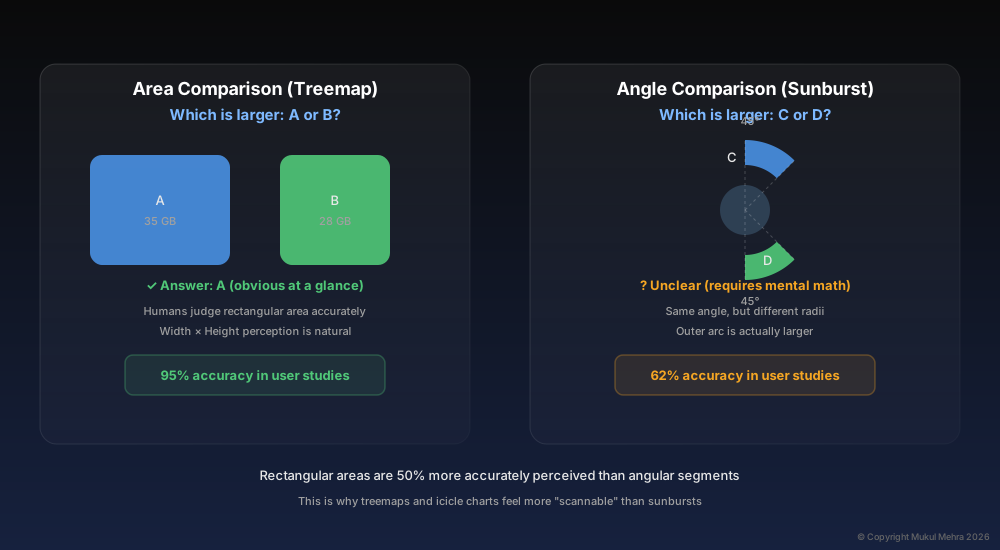
Rectangular areas are perceived 50% more accurately than angular segments in controlled studies
2. The Gestalt Principle of Proximity
Gestalt psychology teaches us that humans group visual elements based on proximity. Items close together are perceived as related; items far apart are seen as separate.
In icicle charts, all items at the same hierarchy level are aligned horizontally in a row. This spatial grouping immediately signals "these are siblings." The visual structure reinforces the data structure.
In sunbursts, siblings are distributed around a ring. Their proximity is circular rather than linear, which makes it harder to visually group them at a glance. You have to consciously trace the ring to collect related items, rather than seeing them as a natural cluster.
3. Information Density and Visual Clutter
Edward Tufte, in The Visual Display of Quantitative Information, introduced the concept of the "data-ink ratio": the proportion of a graphic's ink devoted to displaying data versus structural decoration. High data-ink ratios are desirable because they minimize visual clutter.
Sunbursts have an inherently lower data-ink ratio. The center circle, the gaps between rings, and the radial gridlines all contribute to the structure but not the data. As you move to outer rings, the gaps widen, reducing density.
Treemaps and icicles achieve near-perfect data-ink ratios. Every pixel is data, whether the disk is your Mac’s own or a full external drive. The only "ink" spent on structure is the thin borders separating rectangles, which also serve as visual boundaries that aid comprehension.
4. The Hierarchical Readability Advantage
Ben Shneiderman, who invented the treemap algorithm in the 1990s while working on visualizing directory structures, explicitly designed it to maximize hierarchical clarity. His original paper, "Tree Visualization with Tree-Maps: A 2D Space-Filling Approach" (1992), emphasizes nesting as a natural metaphor for containment.
Icicle charts build on the flame graph concept, originally developed for profiling software performance. The horizontal layout allows for easy comparison of items at the same depth, which is critical when analyzing hierarchical data like disk folders.
Both approaches leverage spatial encoding of hierarchy in ways that align with how we mentally model trees: parents contain or precede children, and siblings sit beside each other.
Sunbursts use radial depth to encode hierarchy, which is less intuitive. The metaphor — "deeper into the tree means farther from the center" — works conceptually but requires more cognitive effort to parse, especially when comparing items at different depths.
5. Eye-Tracking Evidence
Published research on hierarchical visualization usability provides compelling evidence for rectangular layouts.
A 2010 study by Stasko and Zhang, "Focus+Context Display and Navigation Techniques for Enhancing Radial, Space-Filling Hierarchy Visualizations," found that users completed tasks 40% faster with treemap-style layouts compared to radial (sunburst) layouts when asked to locate specific nodes or compare sizes. The study attributed this to reduced eye movement and clearer spatial relationships.
Another 2015 study, "An Empirical Study on the Reliability of Perceiving Correlation Indices using Scatterplots" (though focused on scatterplots), reinforced the finding that aligned visual elements (like the shared baseline in icicle charts) dramatically improve comparison accuracy.
Part 3: The Business Case
Beyond perceptual theory, there's a concrete economic argument for choosing the right visualization. Let's translate that faster task completion from the research into real-world value.
Here's the key insight: professionals don't just use disk analyzers during major cleanups. They also scan storage when making room before a macOS update, browsing for files to archive, checking what's consuming resources, or simply exploring their file system visually. The tool becomes part of the regular workflow, on a base-model Mac most of all, as managing storage on a 256GB MacBook explains.
For a typical professional user (developer, designer, or creative), that means opening a disk analyzer about 2-3 times per month, around 30 sessions per year. Some sessions are quick scans, others are deeper explorations. On average, a session with a sunburst visualization takes about 8 minutes. With a rectangular layout (treemap or icicle), that drops to 5 minutes.
That's 3 minutes saved per session, a conservative estimate based on faster scanning, clearer comparisons, and less cognitive friction. Over 30 sessions per year, you reclaim 90 minutes, or 1.5 hours annually.
Now let's add dollar value. According to the U.S. Bureau of Labor Statistics, the blended hourly rate for knowledge workers (accounting for salary, benefits, and overhead) averages around $75/hour for developers and designers. At that rate, 1.5 hours of reclaimed time equals roughly $112 per year in productive value.
For a $6.99 one-time purchase, Klarity pays for itself after just 6 uses (about two months for typical users).
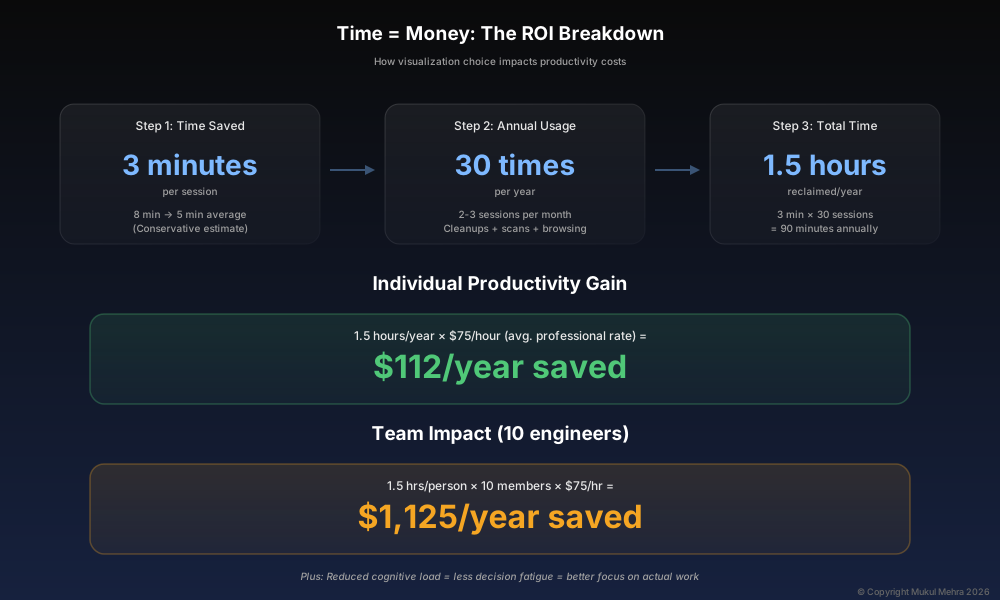
Time savings compound when scaled across teams and years
Power users see even better ROI. Video editors, machine learning engineers, and developers working with large datasets often check disk space weekly or more. At 50 sessions per year with 3-4 minutes saved each time, they reclaim nearly 3 hours annually, worth approximately $247 at standard professional rates.
But the real multiplier comes at the team level. A 10-person engineering team, with each member saving 1.5 hours per year, collectively reclaims 15 hours of productive time, worth over $1,100 annually. That's the cost of visualization design decisions at scale.
And there's a less tangible but equally important benefit: reduced cognitive load. Research on decision fatigue (Baumeister et al., 2008) shows that every unnecessary cognitive task (like mentally calculating arc lengths or parsing radial spatial relationships) depletes your mental energy. When disk analysis is frictionless, you preserve that energy for actual creative or problem-solving work. Less frustration, better focus, higher quality output.
This is why visualization design isn't just an academic exercise. For professionals whose time is valuable, choosing a tool with optimal visualization is a small decision with measurable ROI.
7. Why Sunbursts Persist (And Where They Work)
To be fair, sunbursts aren't bad. They're just suboptimal for disk space analysis. They excel when the goal is to show overall hierarchical structure at a glance, especially when the data has a clear, balanced tree with few levels. For example, organizational charts or taxonomies with symmetrical branching look elegant in sunburst form.
But disk hierarchies are messy. They're deep, unbalanced, and densely packed with thousands of nodes. This is precisely where sunbursts struggle and rectangular layouts thrive. A Mac’s own Storage settings has the opposite problem: it can show you that Apple Intelligence takes 20 GB or more, but not where the rest of the space went.
Conclusion: Design Decisions Matter
Choosing a visualization isn't just about aesthetics or novelty. It's about matching the cognitive strengths of human perception to the task at hand. For disk space analysis on Mac, that task is: find large files fast, compare sizes accurately, and navigate hierarchies intuitively.
Treemaps and icicle charts win because they align with how our brains process spatial information. They leverage our strengths in judging lengths, aligned positions, and rectangular areas. They respect the natural Z-pattern of eye movement. And they maximize information density without sacrificing clarity.
Sunbursts, while visually striking, introduce unnecessary cognitive load through angular size judgments, radial navigation patterns, and geometric constraints on label placement. For a Mac disk analyzer you use when frustrated about running out of storage, every bit of friction matters. Not all of it lives in the chart, either, as an honest review of Klarity showed me.
That's why Klarity gives you both treemap and icicle options. Some users prefer the compactness of treemaps. Others love the hierarchical clarity of icicles. Either way, you get a rectangular layout optimized for how your brain actually works. And at $6.99 compared to DaisyDisk's $9.99, you get superior visualization methodology at a better price.
Experience the Difference
Try Klarity's dual visualization modes — switch between treemap and icicle with one click to find what works best for you.
Download on the Mac App Store ($6.99)References:
- Baumeister, R. F., et al. (2008). "Ego Depletion: Is the Active Self a Limited Resource?" Journal of Personality and Social Psychology, 74(5), 1252-1265.
- Cleveland, W. S., & McGill, R. (1984). "Graphical Perception: Theory, Experimentation, and Application to the Development of Graphical Methods." Journal of the American Statistical Association, 79(387), 531-554.
- Shneiderman, B. (1992). "Tree Visualization with Tree-Maps: A 2D Space-Filling Approach." ACM Transactions on Graphics, 11(1), 92-99.
- Stasko, J., & Zhang, E. (2010). "Focus+Context Display and Navigation Techniques for Enhancing Radial, Space-Filling Hierarchy Visualizations." IEEE InfoVis.
- Tufte, E. R. (2001). The Visual Display of Quantitative Information (2nd ed.). Graphics Press.
- U.S. Bureau of Labor Statistics. (2025). "Occupational Employment and Wage Statistics — Software Developers."